Copilot自定义第三方模型
Copilot自定义第三方模型的教程,包括Chat和Git Commit Message
Chat
目前 VS Code 最新版已经默认支持添加第三方模型,不需要安装任何插件,操作方式如下:
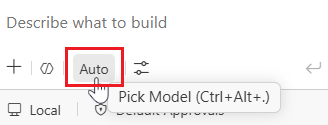
在 Chat 面板点击模型列表
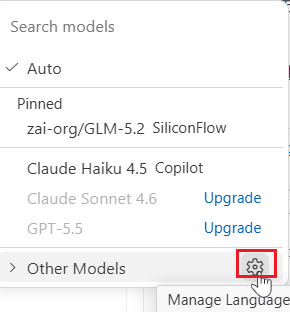
点击 Other Models 旁边的设置按钮
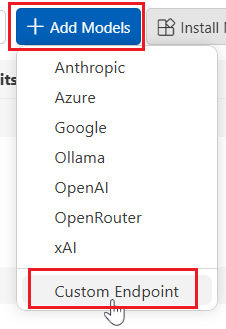
在 Add Models 中点击 Custom Endpoint 即可配置
Git Commit Message
在设置中搜索 chat.utilitySmallModel,在下拉框中选择自定义的模型,即可用自定义模型生成 Git Commit Message。
可以在 settings.json 中添加以下配置项,让模型按照规范生成 message:
1
2
3
4
5
"github.copilot.chat.commitMessageGeneration.instructions": [
    {
        "text": "You are a senior software engineer. Generate a Git commit message using the **Conventional Commits** standard. Follow these rules strictly: ## 1. Format Use this structure: ``` <type>(optional-scope): <short description> (optional body) (optional footer) ``` ## 2. Types Choose the correct type: * **feat**: A new feature (MINOR version bump). * **fix**: A bug fix (PATCH version bump). * **build**: Changes to build system or dependencies. * **chore**: Non-business logic changes (tools, configs, cleanup). * **ci**: Changes to CI/CD configuration. * **docs**: Documentation changes only. * **style**: Code style changes (formatting, spaces, no logic change). * **refactor**: Code restructuring without behavior change. * **perf**: Performance improvements. * **test**: Adding or modifying tests. ## 3. Breaking Changes If the change introduces breaking API changes: * Add `!` after the type or scope * And include a footer: ``` BREAKING CHANGE: <description> ``` Example: ``` feat(api)!: change user login response format BREAKING CHANGE: The login API now returns token as an object instead of string. ``` ## 4. Scope (Optional) You may add a scope for context: ``` feat(parser): support array parsing fix(auth): resolve token refresh bug ``` ## 5. Style Rules * Use **imperative mood**. * Keep the subject line under **72 characters**. * Do not end the subject with a period. * Be clear and concise. * Do not include unnecessary text outside the commit message. ## 6. Output Only output the final **commit message**, nothing else. Use plain text to respond."
    }
]
本文由作者按照 CC BY 4.0 进行授权